Provision Customer Portal Access
POST/customer-portal-access
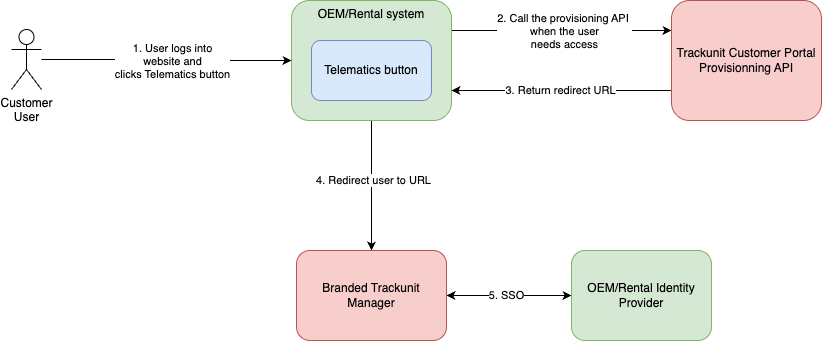
Provision access to a customer's portal for one of the customer's users through SSO. Creates the portal if the customer has none. Provisioning is asynchronous; the response carries a URL to redirect the user to. Idempotent per portal and username: calling again updates the user's email, userRole and entireFleetAccess. The response is the login URL when provisioning completes within the call, otherwise the waiting-page URL.
This endpoint gives one of your customers' users access to that customer's portal through Single Sign-On (SSO).
- It creates the portal if needed, using your account's default portal template. To choose a template yourself, create the portal first with Create Customer Portal for Customer.
- It creates the user directly. The user is a federated SSO user on the portal with access to the customer's assets. There is no invitation to send or accept; they can log in as soon as provisioning is complete. The call is idempotent, so you can make it on every login; changes to the user's details are applied.
- It is asynchronous. The call returns immediately with a URL to redirect the user to. If provisioning is still running when the user arrives, Trackunit Manager shows a waiting page and forwards them to SSO login once it is done. Your integration does not need to wait or poll.
- You can read the run back. The response contains the
accessRequestIdand the currentstatusof the run; the state can be read later with Get Customer Portal Access Request. Completed requests are kept for 30 days.
This API is exclusively available for IrisX customers. Learn more about the IrisX subscription.
Before you start
- A customer-portal SSO connection is configured for your account. Trackunit sets this up; contact your Trackunit representative. Without it, provisioning cannot complete and the user stays on the waiting page.
- Assets are assigned to the customer, through the Customer API, a Rental API sync or Manager. Access in the portal follows the current assignments, so assets assigned later appear without re-provisioning. A customer with no assets can still be provisioned; the user then lands in an empty portal until assets are assigned.
What the user sees
- Your integration redirects them to the returned
url. - If provisioning is still running, a waiting page in Trackunit Manager.
- Login through your SSO connection.
- The customer's portal.
If provisioning fails
- Call the endpoint again with the same request; this starts a new provisioning run.
- If it keeps failing, contact Trackunit support with the
accessRequestIdfrom the response.
Related
- Manual invitation. Unlocking a portal, sending an invite link and having the customer accept it is done in Trackunit Manager; see the Help Center. Both ways of adding users can be used on the same portal.
- SSO for your own employees is a separate setup and not covered by this endpoint. Contact your Trackunit representative.
Request
Responses
- 200
- 400
- 401
- 403
- 404
- 500
URL to redirect the user to.
Bad request
Invalid or missing bearer token in Authorization header
User not allowed to make this request
Resource not found
Internal server error