
24 posts tagged with "Added"

New features, APIs, and capabilities

View All Tags

Iris Apps opt into AI navigation with @trackunit/iris-app-api 2.4.0

Your extensions can now describe their own pages to Trackunit Manager's AI assistant. Add an aiNavigation field to a manifest — a list of in-app routes, each with a path, a title, and a description — and the assistant can take a user straight to the page inside your app that answers their question instead of dropping them on its root.

This works today for every extension type that has a page a user can land on: Fleet, Admin, App Settings, Asset Home, Site Home, Customer Home, and Asset Events Actions. The field is opt-in and purely additive — apps that don't declare it behave exactly as before.

See Extension Point Types — AI navigation for the full reference: the manifest shape, both Tanstack Router styles, and in-app paths for entity-scoped extensions.

Telematics Device API: rollback a configuration job

The Telematics Device API now lets you roll back a previously executed configuration job. Rollback creates new configuration jobs that restore each device to the configuration it had before the original job ran.

Devices that have had their configuration changed since the original job (manually, by another job, or by automation) are excluded from rollback so the rollback never silently overwrites a newer change. A rollback request can produce more than one rollback job because devices are grouped by the previous configuration they shared.

Today, rollback is supported for CAN profile, Modbus profile, and Operating Mode changes. Other configurations the original job touched are excluded from the rollback's desired state — additional configurations will be announced as they become available.

➕ POST: /v2/configuration-jobs/{id}/rollbacks

Rollback a configuration job

Assets API v2

Released stable version v2 of Assets API.

The Assets API v2 builds on the foundation of v1 with expanded querying, improved asset lifecycle management, and enhanced flexibility. In addition to onboarding, offboarding, and updating asset specifications, v2 introduces advanced filtering and pagination, asset querying by multiple identifier types, asset hiding and unhiding, and dedicated support for asset notes. The API also streamlines telematics device attachment flow, providing a more consistent and scalable way to manage assets across accounts and fleets. For more information, see the updated endpoint documentation.

Below a list of all available endpoints:

➕ GET: /asset/v2/assets

Get assets

➕ GET: /asset/v2/assets/{assetId}

Get asset

➕ POST: /asset/v2/assets

Create assets

➕ PATCH: /asset/v2/assets

Update assets

➕ DELETE: /asset/v2/assets/{assetId}

Delete asset

➕ POST: /asset/v2/assets/query

Query assets by identifiers

➕ PATCH: /asset/v2/assets/hidden

Hide or unhide assets

➕ PATCH: /asset/v2/assets/note

Update asset note

➕ POST: /asset/v2/assets/notes/query

Fetch asset notes

➕ POST: /asset/v2/assets/{assetId}/telematics-devices

Attach telematics device
Bluetooth tag configuration API v1

Released stable version v1 of Bluetooth tag configuration API. For more information, see the documentation and introduction of the endpoints.

Below is a list of all available REST endpoints:

KIN Challenge

➕ POST: /v1/kin-challenge/sign

Sign KIN Challenge

Utilization Profiles

➕ POST: /v1/utilization-profiles/search

Search Utilization Profiles

➕ GET: /v1/utilization-profiles/{profileId}

Get Utilization Profile

➕ PUT: /v1/utilization-profiles/{profileId}/acknowledge-desired/{deviceId}

Acknowledge Desired Utilization Profile

➕ PUT: /v1/utilization-profiles/{profileId}/acknowledge-reported/{deviceId}

Acknowledge Reported Utilization Profile

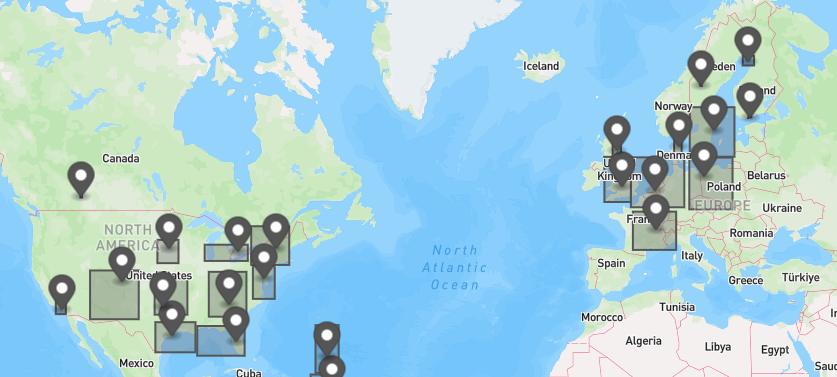
GraphQL Asset Clusters

Released asset clustering in the GraphQL API.

The new assetClusters field supports obtaining clusters of assets based on their current location. Useful for drawing a map of clusters of assets.

It accepts the same AssetFiltersInput as the assets search field, so they can easily be combined if needed.

➕ GQL: Query.assetClusters

See all relevant GQL documentation

map with some asset clusters

Fleet Data Health API v1beta1

Released beta version v1beta1 of Fleet Data Health API. For more information, see the documentation and introduction of the endpoints.

Below is a list of all available REST endpoints:

Issue API

➕ GET: /v1beta1/assets/{assetId}/issues

Get issues by asset

➕ GET: /v1beta1/issues

Get issues

➕ GET: /v1beta1/issues/{issueId}

Get issues

Compaction App API v1

Released stable version v1 of Compaction API. For more information, see the documentation and introduction of the endpoints.

Below is a list of all available REST endpoints:

Filter:

➕ GET: /api/compaction/v1/compactions/trips/{tripId}/filter

Get Trip Filter

➕ PUT: /api/compaction/v1/compactions/trips/{tripId}/filter

Update Trip Filter

➕ DELETE: /api/compaction/v1/compactions/trips/{tripId}/filter

Delete Trip Filter

Searches:

➕ POST: /api/compaction/v1/compactions/searches

Create Saved Search

➕ GET: /api/compaction/v1/compactions/searches

Get All Saved Searches

➕ GET: /api/compaction/v1/compactions/searches/{searchUUID}

Get Saved Search

➕ PUT: /api/compaction/v1/compactions/searches/{searchUUID}

Update Saved Search

➕ DELETE: /api/compaction/v1/compactions/searches/{searchUUID}

Delete Saved Search

Trips:

➕ GET: /api/compaction/v1/compactions/trips/{tripId}

Get Compaction Trip

➕ DELETE: /api/compaction/v1/compactions/trips/{tripId}

Delete Compaction Trip

➕ GET: /api/compaction/v1/compactions/trips/{tripId}/compactions

Get Compaction Datapoints

➕ GET: /api/compaction/v1/compactions/trips/{tripId}/compactions/summarized

Get Summarized Compaction

➕ POST: /api/compaction/v1/compactions/trips

Get Compaction Trips

CAN Faults API v1

Released stable version v1 of CAN Faults API. For more information, see the documentation and introduction of the endpoints.

Below is a list of all available REST endpoints:

Faults:

➕ POST: /public/api/can-faults/faults

Get faults

Faults Summary:

➕ POST: /public/api/can-faults/faults-summary

Get faults summary

Simulated Fault:

➕ GET: /public/api/can-faults/simulated-faults/list

Get simulatable faults

➕ GET: /public/api/can-faults/simulated-faults/list/simulated

Get simulated faults

➕ POST: /public/api/can-faults/simulated-faults/resolve

Resolve simulated fault

➕ POST: /public/api/can-faults/simulated-faults/send

Send simulated fault

➕ GET: /public/api/can-faults/simulated-faults/summary

Get simulated faults summary

Unit ActiveFault:

Get unit active faults

➕ GET: /public/api/can-faults/get-unit-active-faults

Get unit active faults

➕ POST: /public/api/can-faults/get-unit-active-faults