
20 posts tagged with "Added"

New features, APIs, and capabilities

View All Tags

Assets API v2

Released stable version v2 of Assets API.

The Assets API v2 builds on the foundation of v1 with expanded querying, improved asset lifecycle management, and enhanced flexibility. In addition to onboarding, offboarding, and updating asset specifications, v2 introduces advanced filtering and pagination, asset querying by multiple identifier types, asset hiding and unhiding, and dedicated support for asset notes. The API also streamlines telematics device attachment flow, providing a more consistent and scalable way to manage assets across accounts and fleets. For more information, see the updated endpoint documentation.

Below a list of all available endpoints:

➕ GET: /asset/v2/assets

Get assets

➕ GET: /asset/v2/assets/{assetId}

Get asset

➕ POST: /asset/v2/assets

Create assets

➕ PATCH: /asset/v2/assets

Update assets

➕ DELETE: /asset/v2/assets/{assetId}

Delete asset

➕ POST: /asset/v2/assets/query

Query assets by identifiers

➕ PATCH: /asset/v2/assets/hidden

Hide or unhide assets

➕ PATCH: /asset/v2/assets/note

Update asset note

➕ POST: /asset/v2/assets/notes/query

Fetch asset notes

➕ POST: /asset/v2/assets/{assetId}/telematics-devices

Attach telematics device
Bluetooth tag configuration API v1

Released stable version v1 of Bluetooth tag configuration API. For more information, see the documentation and introduction of the endpoints.

Below is a list of all available REST endpoints:

KIN Challenge

➕ POST: /v1/kin-challenge/sign

Sign KIN Challenge

Utilization Profiles

➕ POST: /v1/utilization-profiles/search

Search Utilization Profiles

➕ GET: /v1/utilization-profiles/{profileId}

Get Utilization Profile

➕ PUT: /v1/utilization-profiles/{profileId}/acknowledge-desired/{deviceId}

Acknowledge Desired Utilization Profile

➕ PUT: /v1/utilization-profiles/{profileId}/acknowledge-reported/{deviceId}

Acknowledge Reported Utilization Profile

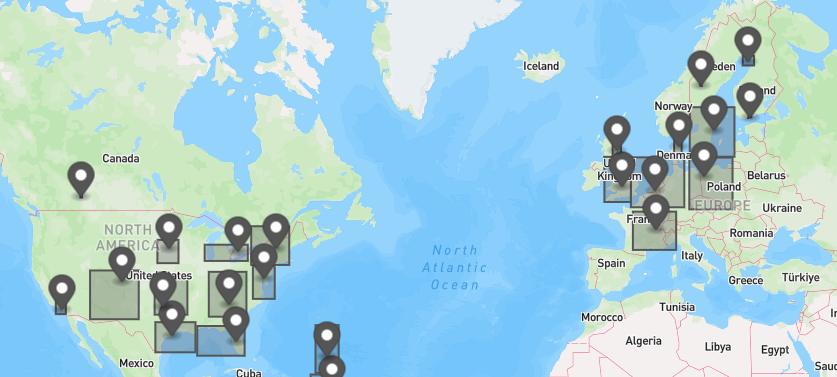
GraphQL Asset Clusters

Released asset clustering in the GraphQL API.

The new assetClusters field supports obtaining clusters of assets based on their current location. Useful for drawing a map of clusters of assets.

It accepts the same AssetFiltersInput as the assets search field, so they can easily be combined if needed.

➕ GQL: Query.assetClusters

See all relevant GQL documentation

map with some asset clusters

Fleet Data Health API v1beta1

Released beta version v1beta1 of Fleet Data Health API. For more information, see the documentation and introduction of the endpoints.

Below is a list of all available REST endpoints:

Issue API

➕ GET: /v1beta1/assets/{assetId}/issues

Get issues by asset

➕ GET: /v1beta1/issues

Get issues

➕ GET: /v1beta1/issues/{issueId}

Get issues

Compaction App API v1

Released stable version v1 of Compaction API. For more information, see the documentation and introduction of the endpoints.

Below is a list of all available REST endpoints:

Filter:

➕ GET: /api/compaction/v1/compactions/trips/{tripId}/filter

Get Trip Filter

➕ PUT: /api/compaction/v1/compactions/trips/{tripId}/filter

Update Trip Filter

➕ DELETE: /api/compaction/v1/compactions/trips/{tripId}/filter

Delete Trip Filter

Searches:

➕ POST: /api/compaction/v1/compactions/searches

Create Saved Search

➕ GET: /api/compaction/v1/compactions/searches

Get All Saved Searches

➕ GET: /api/compaction/v1/compactions/searches/{searchUUID}

Get Saved Search

➕ PUT: /api/compaction/v1/compactions/searches/{searchUUID}

Update Saved Search

➕ DELETE: /api/compaction/v1/compactions/searches/{searchUUID}

Delete Saved Search

Trips:

➕ GET: /api/compaction/v1/compactions/trips/{tripId}

Get Compaction Trip

➕ DELETE: /api/compaction/v1/compactions/trips/{tripId}

Delete Compaction Trip

➕ GET: /api/compaction/v1/compactions/trips/{tripId}/compactions

Get Compaction Datapoints

➕ GET: /api/compaction/v1/compactions/trips/{tripId}/compactions/summarized

Get Summarized Compaction

➕ POST: /api/compaction/v1/compactions/trips

Get Compaction Trips

CAN Faults API v1

Released stable version v1 of CAN Faults API. For more information, see the documentation and introduction of the endpoints.

Below is a list of all available REST endpoints:

Faults:

➕ POST: /public/api/can-faults/faults

Get faults

Faults Summary:

➕ POST: /public/api/can-faults/faults-summary

Get faults summary

Simulated Fault:

➕ GET: /public/api/can-faults/simulated-faults/list

Get simulatable faults

➕ GET: /public/api/can-faults/simulated-faults/list/simulated

Get simulated faults

➕ POST: /public/api/can-faults/simulated-faults/resolve

Resolve simulated fault

➕ POST: /public/api/can-faults/simulated-faults/send

Send simulated fault

➕ GET: /public/api/can-faults/simulated-faults/summary

Get simulated faults summary

Unit ActiveFault:

Get unit active faults

➕ GET: /public/api/can-faults/get-unit-active-faults

Get unit active faults

➕ POST: /public/api/can-faults/get-unit-active-faults

Ownership & Visibility API

New Section: The API for managing ownership and visibility of assets has been moved to its own dedicated section.

Introduction Added: A comprehensive Introduction has been included to explain the key concepts involved in managing ownership and visibility of assets.

Endpoints: The following endpoints are now available for managing ownership and visibility of assets:

List asset shares

Share assets

Unshare assets

Transfer assets

Remove visibility

Emissions API Site Assets Update

Introducing four new endpoints to the Emissions API that allow a breakdown of assets emissions values by site summed up on a monthly basis.

These endpoints provide emissions values for the period they have been on the site. These endpoints are different from the existing monthly endpoints that provide emissions values for the period they have been in use.

Only admin users will have access to assets emissions values by site if the asset has been deleted or removed from the account.

To retrieve a list of site ids use the Sites API.

New Endpoints

➕ GET: /v2/sites/{siteId}/emissions/monthly

Get Assets by Site Monthly

➕ POST: /v2/sites/{siteId}/emissions/monthly

Filter Assets by Site Monthly

➕ GET: /v2/sites/{siteId}/emissions/monthly/summary

Get Assets by Site Monthly Summary

➕ POST: /v2/sites/{siteId}/emissions/monthly/summary

Filter Assets by Site Monthly Summary

Emissions API v2 Update

Introduced new version 2 Emissions API endpoints that removed the field 'estimationConfidence' from the response, in favour of 'dataSourceScore' for individual assets.

Added two new fields to v2 KPI endpoints 'averageDataSourceScore' and 'dataSourceScoreCompilation'.

  • averageDataSourceScore: The average score of the data source for the fleet or filtered assets.
  • dataSourceScoreCompilation: Sums the total of each score into a bucket.

Data Source Score is a new field that provides a score for the data source of the emissions data per asset. The score is a value between 0 and 100, where 0 is the lowest score and 100 is the highest score. The Data Source Score documentation can be found here.

New Endpoints

➕ GET: /v2/emissions/period

Get period

➕ POST: /v2/emissions/period

Filter period

➕ GET: /v2/emissions/period/kpis

Get period KPIs

➕ POST: /v2/emissions/period/kpis

Filter period KPIs

➕ POST: /v2/emissions/monthly

Filter monthly

➕ GET: /v2/emissions/monthly/summary

Get monthly summary

➕ POST: /v2/emissions/monthly/summary

Filter monthly summary

➕ POST: /v2/emissions/lifetime

Filter lifetime

➕ GET: /v2/emissions/lifetime/kpis

Get Lifetime KPIs

➕ POST: /v2/emissions/lifetime/kpis

Filter Lifetime KPIs

➕ POST: /v2/emissions/daily

Filter daily

➕ GET: /v2/emissions/daily/summary

Get daily summary

➕ POST: /v2/emissions/daily/summary

Filter daily summary

➕ GET: /v2/emissions/daily/kpis

Get daily KPIs

➕ POST: /v2/emissions/daily/kpis

Filter daily KPIs

➕ GET: /v2/sites/{siteId}/emissions

Get site

Customer API v1

Released stable version v1 of Customer API as REST and GraphQL endpoint.
For more information, see the documentation and introduction of the endpoints.

➕ Trackunit Iris GraphQL API

Example:

query GetCustomers(
$before: Cursor
$after: Cursor
$last: Int
$first: Int = 20
) {
customers(before: $before, after: $after, first: $first, last: $last) {
edges {
node {
id
name
type
}
}
pageInfo {
hasPreviousPage
hasNextPage
startCursor
endCursor
count
}
}
}

See all relevant GQL documentation

REST

Below a list of all available REST endpoints:

Customer:

➕ GET: /customer/v1/customers/{customerId}

Get customer

➕ GET: /customer/v1/customers

Get customers

➕ POST: /customer/v1/customers

Create customer

➕ PATCH: /customer/v1/customers/{customerId}

Update customer

➕ DELETE: /customer/v1/customers/{customerId}

Delete customer

Customer Contact:

➕ GET: customer/v1/customers/{customerId}/contacts/{contactId}

Get contact

➕ GET: customer/v1/customers/{customerid}/contacts

Get contacts

➕ POST: customer/v1/customers/{customerid}/contacts

Create contact

➕ PATCH: customer/v1/customers/{customerid}/contacts/{contactId}

Update contact

➕ DELETE: customer/v1/customers/{customerid}/contacts/{contactId}

Delete contact

Customer Asset assignments:

➕ GET: customer/v1/customers/{customerid}/assets

Get assets

➕ POST: customer/v1/customers/{customerid}/assets

Update assets