
Bluetooth tag configuration API v1

Released stable version v1 of Bluetooth tag configuration API. For more information, see the documentation and introduction of the endpoints.

Below is a list of all available REST endpoints:

KIN Challenge

➕ POST: /v1/kin-challenge/sign

Sign KIN Challenge

Utilization Profiles

➕ POST: /v1/utilization-profiles/search

Search Utilization Profiles

➕ GET: /v1/utilization-profiles/{profileId}

Get Utilization Profile

➕ PUT: /v1/utilization-profiles/{profileId}/acknowledge-desired/{deviceId}

Acknowledge Desired Utilization Profile

➕ PUT: /v1/utilization-profiles/{profileId}/acknowledge-reported/{deviceId}

Acknowledge Reported Utilization Profile
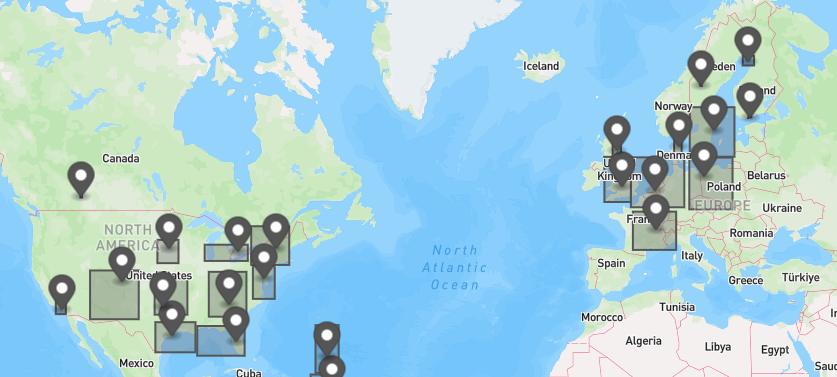
GraphQL Asset Clusters

Released asset clustering in the GraphQL API.

The new assetClusters field supports obtaining clusters of assets based on their current location. Useful for drawing a map of clusters of assets.

It accepts the same AssetFiltersInput as the assets search field, so they can easily be combined if needed.

➕ GQL: Query.assetClusters

See all relevant GQL documentation

map with some asset clusters

Fleet Data Health API v1beta1

Released beta version v1beta1 of Fleet Data Health API. For more information, see the documentation and introduction of the endpoints.

Below is a list of all available REST endpoints:

Issue API

➕ GET: /v1beta1/assets/{assetId}/issues

Get issues by asset

➕ GET: /v1beta1/issues

Get issues

➕ GET: /v1beta1/issues/{issueId}

Get issues

Compaction App API v1

Released stable version v1 of Compaction API. For more information, see the documentation and introduction of the endpoints.

Below is a list of all available REST endpoints:

Filter:

➕ GET: /api/compaction/v1/compactions/trips/{tripId}/filter

Get Trip Filter

➕ PUT: /api/compaction/v1/compactions/trips/{tripId}/filter

Update Trip Filter

➕ DELETE: /api/compaction/v1/compactions/trips/{tripId}/filter

Delete Trip Filter

Searches:

➕ POST: /api/compaction/v1/compactions/searches

Create Saved Search

➕ GET: /api/compaction/v1/compactions/searches

Get All Saved Searches

➕ GET: /api/compaction/v1/compactions/searches/{searchUUID}

Get Saved Search

➕ PUT: /api/compaction/v1/compactions/searches/{searchUUID}

Update Saved Search

➕ DELETE: /api/compaction/v1/compactions/searches/{searchUUID}

Delete Saved Search

Trips:

➕ GET: /api/compaction/v1/compactions/trips/{tripId}

Get Compaction Trip

➕ DELETE: /api/compaction/v1/compactions/trips/{tripId}

Delete Compaction Trip

➕ GET: /api/compaction/v1/compactions/trips/{tripId}/compactions

Get Compaction Datapoints

➕ GET: /api/compaction/v1/compactions/trips/{tripId}/compactions/summarized

Get Summarized Compaction

➕ POST: /api/compaction/v1/compactions/trips

Get Compaction Trips

trackunit/iris-app v1.3.36 - Node upgraded to v22.14.0

In this version of the App SDK, we have upgraded Node to the current LTS version 22.14.0. Make sure to upgrade your workspace to at least Node v22.14.0.

If using volta, you can install the latest LTS version of Node by running:

volta install node@lts

Otherwise, you can download the latest LTS version of Node from the Node.js website.

CAN Faults API v1

Released stable version v1 of CAN Faults API. For more information, see the documentation and introduction of the endpoints.

Below is a list of all available REST endpoints:

Faults:

➕ POST: /public/api/can-faults/faults

Get faults

Faults Summary:

➕ POST: /public/api/can-faults/faults-summary

Get faults summary

Simulated Fault:

➕ GET: /public/api/can-faults/simulated-faults/list

Get simulatable faults

➕ GET: /public/api/can-faults/simulated-faults/list/simulated

Get simulated faults

➕ POST: /public/api/can-faults/simulated-faults/resolve

Resolve simulated fault

➕ POST: /public/api/can-faults/simulated-faults/send

Send simulated fault

➕ GET: /public/api/can-faults/simulated-faults/summary

Get simulated faults summary

Unit ActiveFault:

Get unit active faults

➕ GET: /public/api/can-faults/get-unit-active-faults

Get unit active faults

➕ POST: /public/api/can-faults/get-unit-active-faults

trackunit/iris-app v0.0.5 - upgrade to rspack from webpack

In this version of our Iris App SDK we have added support for Rspack as well as the existing Webpack.

To read more on rspack, please visit the rspack documentation.

Iris apps created with @trackunit/iris-app@0.0.5 should already have the required rspack configuration.

Rename and update the webpack config file

Rename the webpack.config.ts file to rspack.config.ts and update the file to use the rspack configuration.

For the new rspack.config.ts file, you shold change the following import:

import { Configuration } from "webpack";

Change to:

import { Configuration } from "@rspack/core";

The end result should look like the following:

import { Configuration } from "@rspack/core";

export default (configuration: Configuration) => {
return configuration;
};

Change the following entries in targets map in the project.json file of your iris app.

For the build target, change the following:

"executor": "@trackunit/iris-app:build",

Change to:

"executor": "@trackunit/iris-app-sdk-rspack:build",

For the serve target, change the following:

"executor": "@trackunit/iris-app:serve",

Change to:

"executor": "@trackunit/iris-app-sdk-rspack:serve",

Also change the webpackConfig option to point to the new rspack.config.ts file instead of the webpack.config.ts file, and rename it to rspackConfig.

The end result should look something like the following.

...
"build": {
"executor": "@trackunit/iris-app-sdk-rspack:build",
"options": {
"outputPath": "dist/apps/your_app",
"rspackConfig": "apps/your_app/rspack.config.ts"
},
"outputs": ["{options.outputPath}"]
},
"serve": {
"executor": "@trackunit/iris-app-sdk-rspack:serve",
"options": {
"rspackConfig": "apps/your_app/rspack.config.ts"
},
"outputs": ["{options.outputPath}"]
},
...

Ownership & Visibility API

New Section: The API for managing ownership and visibility of assets has been moved to its own dedicated section.

Introduction Added: A comprehensive Introduction has been included to explain the key concepts involved in managing ownership and visibility of assets.

Endpoints: The following endpoints are now available for managing ownership and visibility of assets:

List asset shares

Share assets

Unshare assets

Transfer assets

Remove visibility